We have compiled a list of manufacturers, distributors, product information, reference prices, and rankings for Manual creation software.
ipros is IPROS GMS IPROS One of the largest technical database sites in Japan that collects information on.

Manual creation software Product List and Ranking from 8 Manufacturers, Suppliers and Companies

Last Updated: Aggregation Period:Nov 19, 2025~Dec 16, 2025
This ranking is based on the number of page views on our site.

Manual creation software Manufacturer, Suppliers and Company Rankings

Last Updated: Aggregation Period:Nov 19, 2025~Dec 16, 2025
This ranking is based on the number of page views on our site.

  1. スタディスト Tokyo//IT/Telecommunications
  2. VideoStep Tokyo//software
  3. タック株式会社(イビデングループ) 営業統括部 産業・公共営業グループ Gifu//IT/Telecommunications
  4. 4 フィンテックス Tokyo//others
  5. 4 ダイテック 本社・広島事業所 Hiroshima//Service Industry

Manual creation software Product ranking

Last Updated: Aggregation Period:Nov 19, 2025~Dec 16, 2025
This ranking is based on the number of page views on our site.

  1. Explanation material "Tips for Utilizing Video Manuals Without Just Making Them and Ending" スタディスト
  2. VideoStep VideoStep
  3. Cloud-based Manual Operation System Cloudock フィンテックス
  4. Smart Device Publisher ダイテック 本社・広島事業所
  5. 4 How to create a video manual? フォトロン

Manual creation software Product List

1~12 item / All 12 items

Displayed results

Cloud-based Manual Operation System Cloudock

Innovating all aspects of manual creation services for cost reduction, high quality, and short delivery times.

Cloudock is a specialized ASP service for creating manuals. When creating various documents such as product instruction manuals and business operation manuals, Cloudock can meet needs such as "quality improvement," "cost reduction," and "shortened delivery times" compared to traditional methods. Cloudock is currently applying for a business model patent.

  • Catalog and manual creation

Added to bookmarks

Bookmarks list

Bookmark has been removed

Bookmarks list

You can't add any more bookmarks

By registering as a member, you can increase the number of bookmarks you can save and organize them with labels.

Free membership registration

Explanation material "Tips for Utilizing Video Manuals Without Just Making Them and Ending"

[Free Download] Accelerate on-site education and technology transfer! A guide document summarizing how to utilize video manuals and successful case studies is now available.

The video manual we created is not being viewed..." "I can't effectively communicate the specialized tasks..." Are you feeling these challenges in on-site training and knowledge transfer? In recent years, while video manuals that allow learning by watching have gained attention, there are still many cases where they are not utilized on-site and end up being "just created." Therefore, we have prepared a free resource that covers everything from tips for creating and utilizing video manuals to common mistakes and success stories: 'Tips for Utilizing Video Manuals Without Just Ending Up with Creation.' What you can learn from this resource: - Successful patterns and common mistakes in utilizing video manuals - Key points for maximizing educational effectiveness - Success stories of companies that have introduced video manuals to promote multi-skilled workers with clear instructions - AI features that dramatically enhance the efficiency of video manual creation *You can immediately view detailed content by downloading the catalog.

  • Catalog and manual creation

Added to bookmarks

Bookmarks list

Bookmark has been removed

Bookmarks list

You can't add any more bookmarks

By registering as a member, you can increase the number of bookmarks you can save and organize them with labels.

Free membership registration

Smart Device Publisher

No special applications or editors needed! You can produce and operate it in-house without any special know-how.

The "Smart Device Publisher" allows you to distribute the manuals you create to head-mounted displays. Even without special know-how, you can produce and operate it in-house, and it includes features and icons specialized for manual creation. No special applications or editors are required. It can also be used as a tool for creating business manuals. 【Features】 ■ Distribute created manuals to head-mounted displays ■ Easy creation with PowerPoint (supports multiple languages) ■ No special applications or editors are required ■ Can also be used as a tool for creating business manuals ■ Includes features and icons specialized for manual creation *For more details, please refer to the PDF materials or feel free to contact us.

  • Software (middle, driver, security, etc.)

Added to bookmarks

Bookmarks list

Bookmark has been removed

Bookmarks list

You can't add any more bookmarks

By registering as a member, you can increase the number of bookmarks you can save and organize them with labels.

Free membership registration

How to create a video manual?

Tips for making it and a 3-step creation process explained! We will also introduce convenient apps for shooting and editing.

If there has been a suggestion to create video manuals in-house, many may not know how to proceed with the creation. This document includes tips on how to create video manuals, a method to do so in three steps, and useful video creation apps. It is not uncommon to feel that "creating videos seems difficult" or "I don't know where to start." We encourage you to read on. [Contents] ■ Tips for creating effective video manuals by process ■ Explanation of how to create video manuals in three steps ■ Which is recommended for video manual creation apps: free or paid? ■ Summary: Let's efficiently create video manuals using convenient apps * For more details, please refer to the PDF document or feel free to contact us. * We are currently seeking distributors and sales agents for Photron-Mobile Video Creator.

  • Embedded applications for mobile phones and PDAs

Added to bookmarks

Bookmarks list

Bookmark has been removed

Bookmarks list

You can't add any more bookmarks

By registering as a member, you can increase the number of bookmarks you can save and organize them with labels.

Free membership registration

VideoStep

Let's turn the organization's know-how into videos! Thoroughly pursue a "simple user experience."

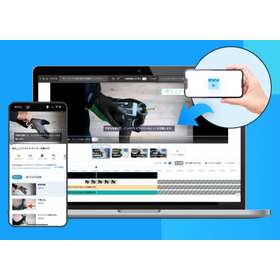
"VideoStep" is a platform that allows you to upload videos taken on your smartphone or computer in a YouTube-like manner, making it easy to share business know-how. Even without experience in video editing, you can create videos with the same ease as using PowerPoint or Excel. By focusing on features specifically for manual creation and striving to make the user experience as close as possible to the familiar operations of PowerPoint and Excel, we achieve a simplicity that traditional video editing software lacks. 【Features】 ■ Organizational video management is possible with version control and approval workflows ■ Smooth multilingual support with AI ■ Searchability similar to YouTube ■ Visualization of video viewing status and comprehension ■ Accessibility for use anywhere *For more details, please download the PDF or feel free to contact us.

  • Catalog and manual creation

Added to bookmarks

Bookmarks list

Bookmark has been removed

Bookmarks list

You can't add any more bookmarks

By registering as a member, you can increase the number of bookmarks you can save and organize them with labels.

Free membership registration

What to do when you don't have time to create videos? | Introducing 5 key points

Explaining important points to efficiently create video manuals!

This time, I will discuss how to address situations where it is difficult to find time for creating video manuals. When working on manuals, it is necessary to spend a certain amount of time on filming and editing videos. However, there are cases where it is hard to find that time while carrying out regular business operations. Nevertheless, even when regular work is busy and time is limited, it is possible to achieve the objectives of video creation by reaffirming the purpose of the videos and efficiently producing the necessary content. This can lead to improved educational efficiency and standardization of operations. If you want to advance manual creation but find that the person in charge is too busy to make progress, please take a look. *For more detailed information, you can refer to the related links. Feel free to contact us for more details.

  • Catalog and manual creation

Added to bookmarks

Bookmarks list

Bookmark has been removed

Bookmarks list

You can't add any more bookmarks

By registering as a member, you can increase the number of bookmarks you can save and organize them with labels.

Free membership registration

What are the three issues that video manuals solve?

We will also introduce the effects of utilizing video manuals and actual case studies of their effectiveness!

This time, I will introduce three issues that video manuals can solve. I believe many people might think, "The initiative of video manuals seems useful, but I don't know specifically how it can help." In this article, I will categorize various issues that can be resolved through the use of video manuals into three groups and present them in an easy-to-understand manner for the readers. *You can view the detailed content of the article through the related links. For more information, please feel free to contact us.*

  • Catalog and manual creation

Added to bookmarks

Bookmarks list

Bookmark has been removed

Bookmarks list

You can't add any more bookmarks

By registering as a member, you can increase the number of bookmarks you can save and organize them with labels.

Free membership registration

Video and AR Manual System [Dive]

Accelerating the transmission of technology and sharing of knowledge through videos and AR, turning on-site expertise into an asset that anyone can use.

The video and AR manual system Dive is a field-specific solution that shares and inherits the accumulated work know-how and tacit knowledge in manufacturing sites as "usable knowledge" by utilizing videos and AR. By simply filming and uploading the work process, our patented AI technology automatically segments and edits the video, generating a video manual that can be used as a procedure document. Furthermore, by linking equipment and work targets with the manual through AR, we create an environment where understanding and execution can be done intuitively on-site. Through proficiency management linked to a skill map, we visualize who has mastered which skills to what extent, supporting planned education and knowledge sharing. 【Features】 - Reduces video editing workload by approximately 90%, allowing for rapid accumulation of knowledge - Achieves "easy-to-understand" manuals on-site through AR utilization - Visualizes knowledge that tends to become personalized through skill map integration - Supports the creation of a system that enables continuous knowledge sharing

Added to bookmarks

Bookmarks list

Bookmark has been removed

Bookmarks list

You can't add any more bookmarks

By registering as a member, you can increase the number of bookmarks you can save and organize them with labels.

Free membership registration

[Case Study on Solving Issues in Smart Factory Construction Support] Work Analysis and Manual Creation

It is also possible to create still images from recorded videos! An example of easily creating documents such as work instructions and forms.

We will introduce a case study that solved the challenges of "work analysis and manual creation" with the support of Astec in building smart factories. Many companies are creating work manuals for the purposes of training new employees, transferring skills, and standardizing work processes. However, despite the significant effort required to create these manuals, it can be difficult to convey practical information from the field, such as subtle nuances during work. By using ICT tools, it is possible to easily create video-enhanced work manuals by filming the work site. Additionally, by splitting the video with a mouse click, you can measure work time, analyze comparison videos, and create workload charts, which can also be utilized for skill transfer and standardizing work distribution. 【Case Overview: Creating Video-Enhanced Work Standards】 ■ Expected Effects - Skill transfer (training new employees), realistic cost management, improvement of labor productivity, stabilization of quality, enhancement of labor safety, reduction of indirect work ■ Main Functions and Features - Work division by elements, accurate work time measurement, comments on videos *For more details, please refer to the PDF materials or feel free to contact us.

Added to bookmarks

Bookmarks list

Bookmark has been removed

Bookmarks list

You can't add any more bookmarks

By registering as a member, you can increase the number of bookmarks you can save and organize them with labels.

Free membership registration

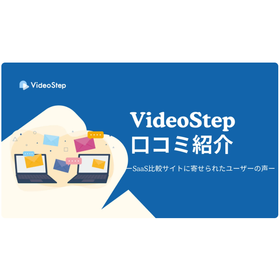
Can it really be created easily? | Introducing VideoStep reviews

Introducing user feedback collected on the SaaS comparison site! Please use it to assist in gathering information for video manuals.

This time, we would like to introduce reviews from users who are utilizing VideoStep. We will deliver the genuine voices of other users, which are essential for considering product implementation and gathering information. Please take a look. Feedback from users who have actually implemented the product may come not only directly to us but also through external media. This time, we would like to present objective reviews, so we will share feedback collected on the SaaS comparison site "BOXIL SaaS." *You can view the detailed content of the article through the related links. For more information, please feel free to contact us.

  • Catalog and manual creation

Added to bookmarks

Bookmarks list

Bookmark has been removed

Bookmarks list

You can't add any more bookmarks

By registering as a member, you can increase the number of bookmarks you can save and organize them with labels.

Free membership registration

What are the characteristics of companies that can expect significant benefits from utilizing video manuals?

Thorough explanation of three patterns! We also introduce a free video manual diagnosis.

In this blog, we will introduce three patterns of companies that can expect significant benefits from utilizing video manuals. While the implementation of video manuals can bring results for many companies, it is not necessarily suitable for all. Since it involves a certain cost, it is important to understand the characteristics of companies that are likely to achieve substantial benefits in relation to the expenses when considering the adoption of video manuals. This time, the VideoStep support team has analyzed three patterns where the implementation of video manuals tends to be effective, based on their ongoing support for many companies. Companies and representatives considering the introduction of video manuals are encouraged to use this as a reference. *For detailed content of the article, please refer to the related links. For more information, feel free to contact us.

  • Catalog and manual creation

Added to bookmarks

Bookmarks list

Bookmark has been removed

Bookmarks list

You can't add any more bookmarks

By registering as a member, you can increase the number of bookmarks you can save and organize them with labels.

Free membership registration

Automate tedious task manual creation with AI! "Easy AI Development"

With "Easy AI Development," you can develop a dedicated AI system for your company starting from 100,000 yen, and AI will automatically create tedious work manuals!

The AI checklist creation feature significantly reduces the time required to create checklists for business manuals and work procedures, effectively preventing the occurrence of troubles. It can accommodate a variety of industries, business types, and operations, and users can flexibly set output content and constraints. "Easy AI Development" 1. Develop a dedicated AI app for your company By developing based on AI app templates and focusing only on the necessary functions, we achieve a low-cost solution by eliminating waste. We can also flexibly respond to system integration and function expansion. 2. Propose optimal AI utilization methods AI experts will listen to your challenges and objectives, and propose the most suitable AI tools and business improvement plans. You can consult us easily even if you do not have a specific utilization image at this stage. 3. Clear cost structure and start at a low price We have established a clear cost structure for each function, allowing for a small start from 100,000 yen. By gradually expanding functions according to usage, you can proceed with implementation while reducing risks. [Service Site] https://career-survival.com/kantan-ai/

  • Document and Data Management

Added to bookmarks

Bookmarks list

Bookmark has been removed

Bookmarks list

You can't add any more bookmarks

By registering as a member, you can increase the number of bookmarks you can save and organize them with labels.

Free membership registration